All the models in this page were created by Sara Vieira and are freely available to download from any of the sandboxes.
There are many types of 3D model extensions, in this page we will focus on loading the three most common ones: GLTF, FBX and OBJ. All of these will use the useLoader composable but in slightly different ways.
This whole section will assume you have placed your models in the public folder or in a place in your application where you can import them easily.
Loading GLTF models
Starting with the open standard and the one that has more support in vue-threejs we will load a .gltf model.
Let's start by importing the two things we need:
import { useLoader } from '@bluera/vue-threejs'
import { GLTFLoader } from 'three/addons/loaders/GLTFLoader.js'
With this we can create a Model component and place it in our scene like so:
<script setup>
import { useLoader } from '@bluera/vue-threejs'
import { GLTFLoader } from 'three/addons/loaders/GLTFLoader.js'

const gltf = useLoader(GLTFLoader, '/Poimandres.gltf')
</script>

<template>
  <primitive v-if="gltf" :object="gltf.scene" />
</template>
You can play with the sandbox and see how it looks here after I added an HDRI background:
Loading GLTF models as Vue Components
Here comes the really fancy part, you can transform these models into Vue components and then use them as you would any Vue component.
To do this, grab your GLTF model and head over to https://gltf.pmnd.rs/ and drop your GLTF, after that you should see something like:
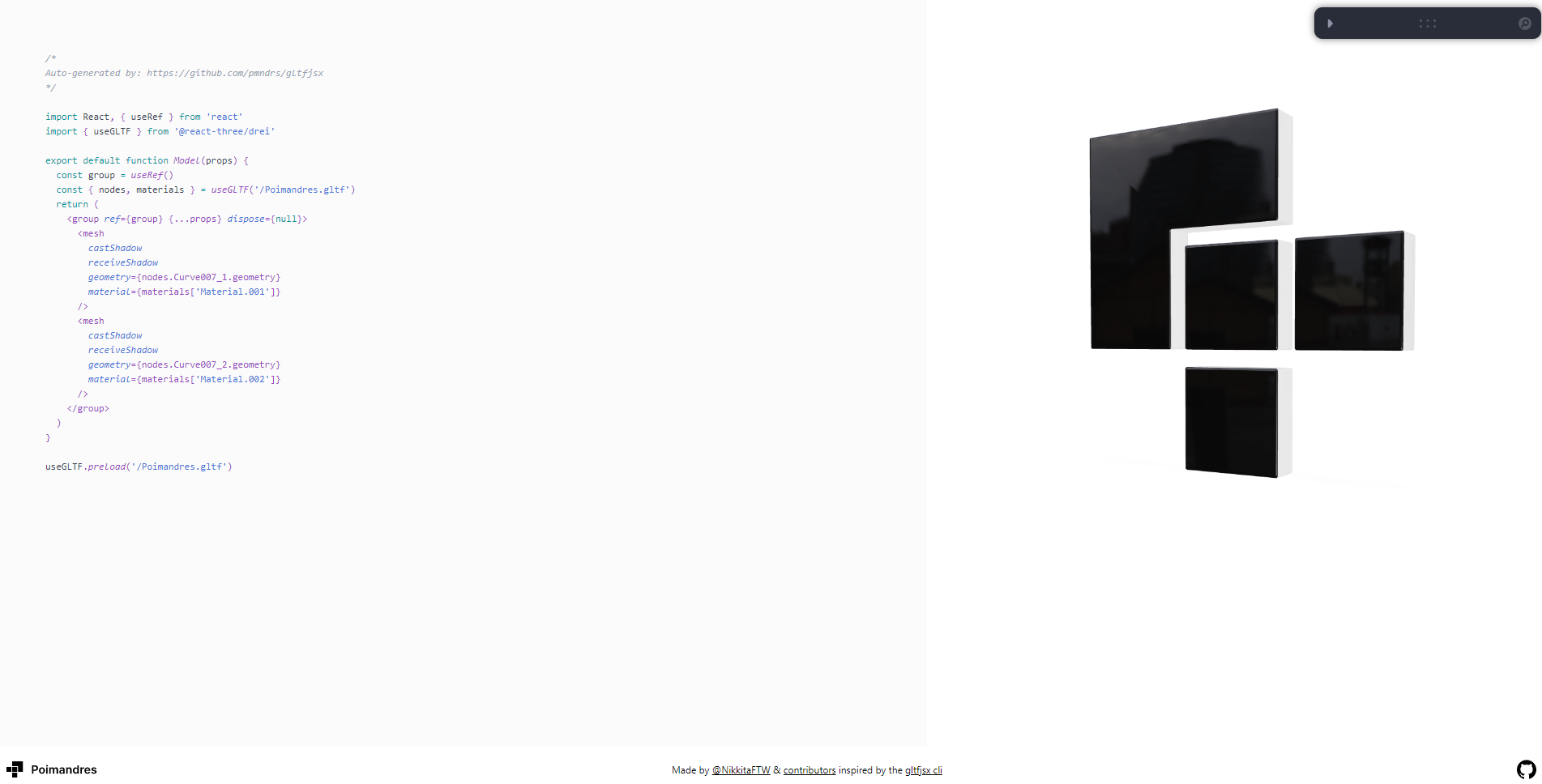
Let's now copy the code and adapt it for Vue in Model.vue:
<script setup>
/*
Auto-generated by: https://github.com/pmndrs/gltfjsx
Adapted for vue-threejs
*/
import { ref, computed } from 'vue'
import { useGLTF } from '@bluera/vue-threejs-drei'

const groupRef = ref()
const gltf = useGLTF('/Poimandres.gltf')
const nodes = computed(() => {
  if (!gltf.value) return null
  const map: Record<string, THREE.Object3D> = {}
  gltf.value.scene.traverse((child) => {
    map[child.name] = child
  })
  return map
})
</script>

<template>
  <group v-if="nodes" ref="groupRef" :dispose="null">
    <mesh castShadow receiveShadow :geometry="nodes.Curve007_1?.geometry" :material="nodes.Curve007_1?.material" />
    <mesh castShadow receiveShadow :geometry="nodes.Curve007_2?.geometry" :material="nodes.Curve007_2?.material" />
  </group>
</template>
useGLTF returns a ShallowRef<GLTF | null> — the GLTF object becomes available asynchronously after loading completes. You can configure Draco decoding by passing { draco: true } or a custom decoder path.
Now we can import our model like we would import any Vue component and use it in our app:
<script setup>
import { Canvas } from '@bluera/vue-threejs'
import { Environment } from '@bluera/vue-threejs-drei'
import Model from './Model.vue'
</script>

<template>
  <div class="App">
    <Canvas>
      <Suspense>
        <Model />
        <Environment files="/sunset.hdr" background />
      </Suspense>
    </Canvas>
  </div>
</template>
Loading OBJ models
In this case, we will use the trusted useLoader composable but in combination with three.js OBJLoader.
import { OBJLoader } from 'three/addons/loaders/OBJLoader.js'
import { useLoader } from '@bluera/vue-threejs'
With these imported let's get the mesh into our scene:
<script setup>
import { useLoader } from '@bluera/vue-threejs'
import { OBJLoader } from 'three/addons/loaders/OBJLoader.js'

const obj = useLoader(OBJLoader, '/Poimandres.obj')
</script>

<template>
  <primitive v-if="obj" :object="obj" />
</template>
And here we go, we have an OBJ model showing on the web! Pretty cool ah?
You can play with the sandbox here:
Loading FBX models
Let's again use the trusted useLoader but this time with the FBXLoader that comes from three.js
import { useLoader } from '@bluera/vue-threejs'
import { FBXLoader } from 'three/addons/loaders/FBXLoader.js'
To create our scene we can get the FBX as a return value of the useLoader by passing the FBXloader and the location of our file like so:
<script setup>
import { useLoader } from '@bluera/vue-threejs'
import { FBXLoader } from 'three/addons/loaders/FBXLoader.js'

const fbx = useLoader(FBXLoader, '/Poimandres.fbx')
</script>

<template>
  <primitive v-if="fbx" :object="fbx" />
</template>
You can play with the sandbox here:
Showing a loading state
If your model is big and takes a while to load, you can use Vue's <Suspense> with a pending slot to show a loading indicator:
<script setup>
import { Canvas } from '@bluera/vue-threejs'
import Model from './Model.vue'
</script>

<template>
  <Canvas>
    <Suspense>
      <Model />
      <template #fallback>
        <!-- Vue keeps old content visible during Suspense re-entrance -->
      </template>
    </Suspense>
  </Canvas>
</template>
For HTML-based loading overlays, use the Canvas #overlay slot or the Html component from @bluera/vue-threejs-drei.